
Krea vs. Pika: Which AI Video Tool Is Right for You?
AI video generation is becoming increasingly accessible, but different tools take very different approaches. Krea combines AI video generation with image creation, editing, upscaling and access to multiple models, while Pika focuses more heavily on creating short, creative AI videos and effects. Both can be useful for creators, but they are designed around somewhat different workflows. In this comparison, we look at how Krea and Pika differ in features, creative control, ease of use, pricing and practical use cases.
Krea vs. Pika at a Glance
* Prices shown are based on annual billing and may change over time.
Krea
AI creative platform for image and video generation, editing and creative workflows.
What is Krea?
Krea is an AI creative platform that combines image and video generation, editing and other creative tools in one workspace.
Rather than focusing on a single type of AI generation, Krea gives users access to different models and creative workflows from one platform. This makes it possible to generate, modify and enhance visual content without constantly switching between different tools.
Key Features
⭐ Image generation
⭐ AI video generation
⭐ Realtime Canvas
⭐ Access to multiple AI models
⭐ Image editing and upscaling
⭐ Custom styles and creative workflows
Pricing & Plans
Pros
✅ Wide range of creative tools in one platform
✅ Access to multiple AI models
✅ Image and video generation
✅ Fast experimentation and iteration
✅ Editing and upscaling built into the platform
✅ Useful for different types of visual content
Cons
❌ Large number of features can make the platform feel complex
❌ Credit-based system can make usage difficult to estimate
❌ Some advanced features require paid plans
❌ Different models can produce noticeably different results
Best For
Krea is particularly suited for creators who want more than just an AI video generator. Its combination of image generation, video generation, editing and multiple models makes it useful for experimenting with different visual workflows.
It can be especially interesting for creators who want to try different models and develop an idea from the first image through to the final video.
Pika AI
Pika is an AI video generator focused on creating short-form videos, animations, and creative visual effects.
What It Does
Pika allows users to generate short AI videos from text prompts, images, and existing videos. Its workflow focuses heavily on creative effects, animations, and short-form visual content.
Key Features
⭐ Text-to-video generation
⭐ Image-to-video generation
⭐ AI-powered creative effects
⭐ Pikaffects and other visual transformations
⭐ Short-form video creation
⭐ Browser and mobile support
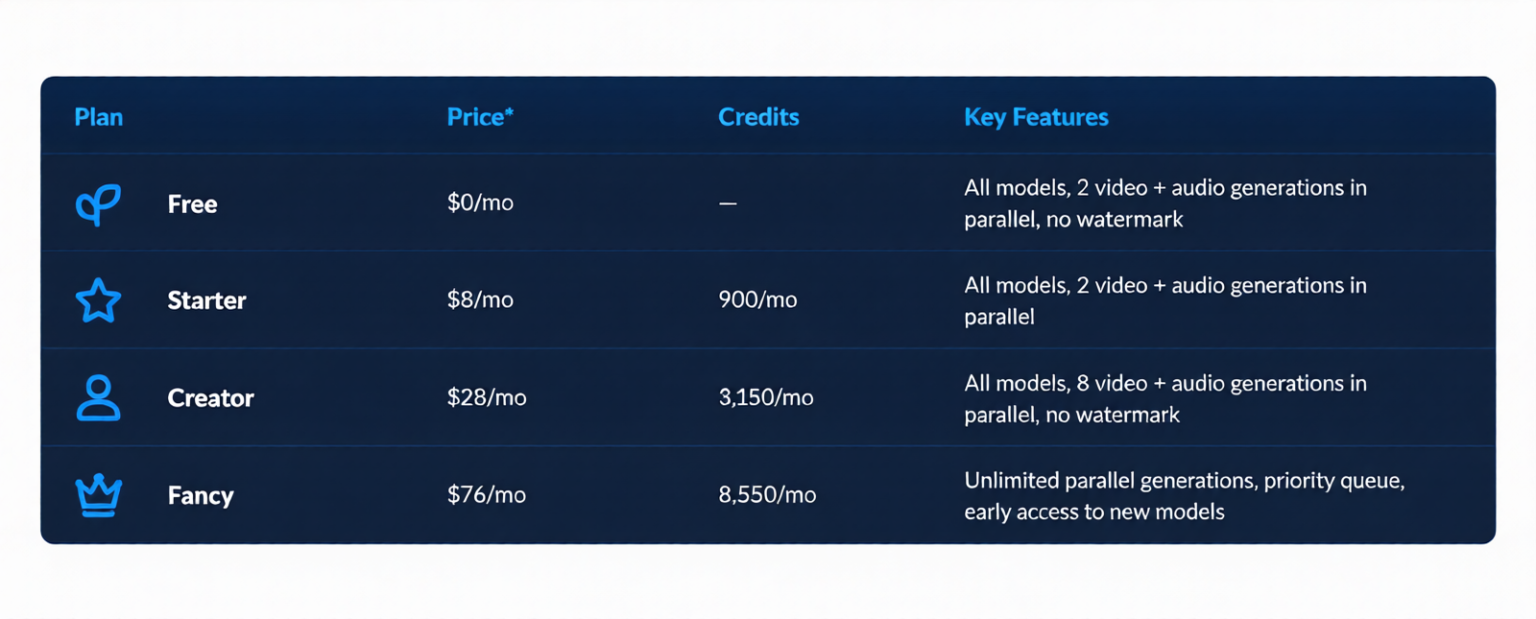
Pricing & Plans
Pros
✅ Beginner-friendly workflow
✅ Strong focus on creative AI video
✅ Useful for short-form content and social media
✅ Creative effects and transformations
✅ Free plan available
Cons
❌ Credit usage can become expensive for heavy users
❌ Results can sometimes be inconsistent
❌ Some generations may contain visual artifacts
❌ More focused on video than broader creative workflows
Best For
Pika is particularly suited to creators who mainly want to experiment with AI-generated videos, creative effects, and short-form social media content.
Krea vs. Pika: What’s the Difference?
The biggest difference between Krea and Pika is their overall focus.
Krea is a broader creative AI platform. It brings together different models and tools for image generation, video generation, editing, upscaling, and other creative workflows.
Pika is more focused on AI video creation. Its features are designed around generating short videos and applying creative effects and transformations.
This means the better fit depends largely on what you want to create.
Final Takeaway
Krea and Pika are both useful AI tools, but they are designed around different creative workflows.
Krea offers a broader set of AI-powered creative tools and models, making it interesting for users who want to experiment beyond video generation.
Pika takes a more focused approach, with an emphasis on AI video generation, creative effects, and short-form content.